Documentation for developers
Under The Hood Of iiifpapi3
iiifpapi3` is based on multiple inheritance. The attributes and the methods common to multiple objects are grouped together and inherited by resources that used them.
The following figure shows the inheritance diagram of the classes:
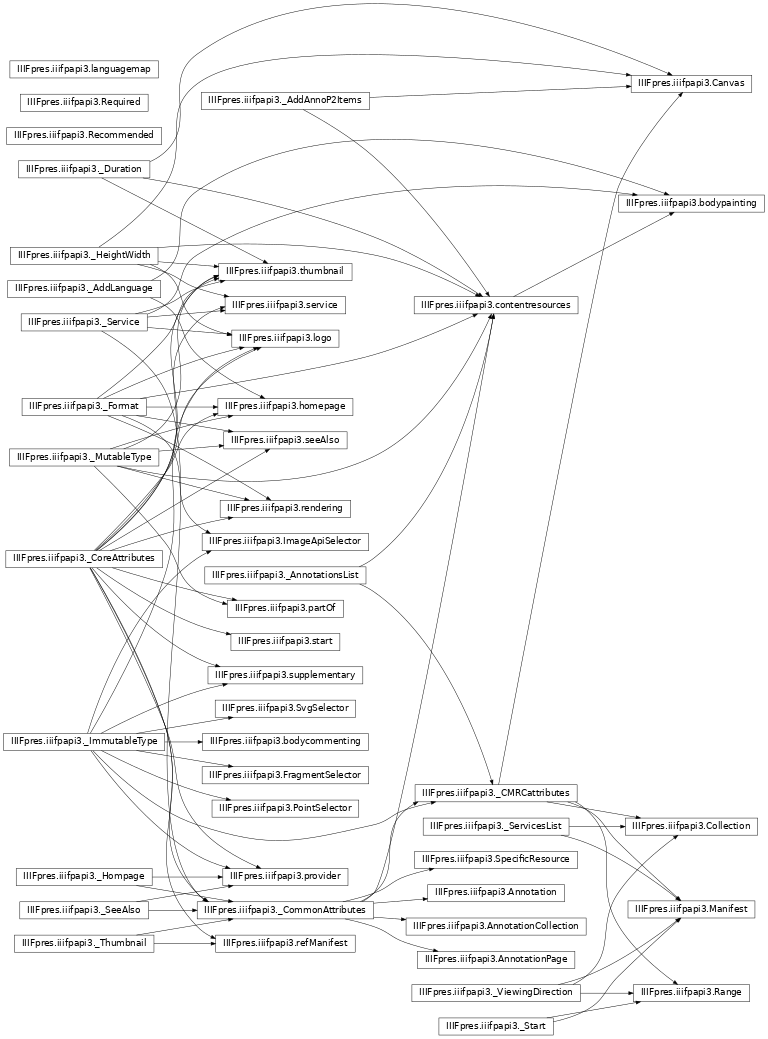
IIIFpres package gives you an overview of the public classes that are described in the IIIF presentation API 3.0.
For following RFC2119 special classes are used for expressing if an attribute of the object MUST, SHOULD or MAY be provided :
- class IIIFpres.iiifpapi3.Recommended(description=None)[source]
HELPER CLASS
Note
This is not an IIIF object but a class used by this software to identify recommended fields. This is equivalent to SHOULD statement in the guideline with the meaning of https://tools.ietf.org/html/rfc2119.
- class IIIFpres.iiifpapi3.Required(description=None)[source]
HELPER CLASS
Note
This is not an IIIF object but a class used by this software to identify required fields. This is equivalent to MUST statement in the guideline with the meaning of https://tools.ietf.org/html/rfc2119 .
While attribute set to None must be interpreted as: “you MAY provide the value”.
However, some iiifpapi3 classes are private, their name start with an underscore because they are actually abstractions for following the “Don’t repeat your self” principle and easing the conceptualization of IIIF Presentation API.
We can divide them in two groups:
Grouping classes
They group common IIIF resource structures.
- class IIIFpres.iiifpapi3._CoreAttributes[source]
HELPER CLASS
Core attributes are the attributes in all the major classes/containers of IIIF namely: Collection, Manifest, Canvas, Range and Annotation Page, Annotation and Content and also in the minor classes such as SeeAlso and partOf.
The core attributes are: ID, Type, Label
ID an type attributes are required. The other might vary.
- set_id(objid=None, extendbase_url=None)[source]
Set the ID of the object
https://iiif.io/api/presentation/3.0/#id
IIIF: The URI that identifies the resource. If the resource is only available embedded within another resource (see the terminology section for an explanation of “embedded”), such as a Range within a Manifest, then the URI may be the URI of the embedding resource with a unique fragment on the end. This is not true for Canvases, which must have their own URI without a fragment.
- Parameters:
objid (str, optional) – A string corresponding to the ID of the object id = objid.Defaults to None.
extendbase_url (str , optional) – A string containing the URL part to be joined with the iiifpapi3.BASE_URL: id = iiifpapi3.BASE_URL + extendbase_url. Defaults to None.
- add_label(language, text)[source]
Add a label to the object.
- Parameters:
language (str) – The language of the label.
text (str or list of str) – The content of the label.
Example
>>> iiifobj.add_label("en", "A painting")
>>> iiifobj.add_label("en", ["Canvas","Oil"])
IIIF : A human readable label, name or title. The label property is intended to be displayed as a short, textual surrogate for the resource if a human needs to make a distinction between it and similar resources, for example between objects, pages, or options for a choice of images to display. The label property can be fully internationalized, and each language can have multiple values.
- json_dumps(dumps_errors=False, ensure_ascii=False, sort_keys=False, context=None)[source]
Dumps the content of the object in JSON format.
- Parameters:
dumps_errors (bool, optional) – If set true it shows any problem found directly on the JSON file with a Required or Recommended tag.Defaults to False.
ensure_ascii (bool, optional) – Ensure ASCI are used. Defaults to False.
sort_keys (bool, optional) – Sort the keys. Defaults to False.
context (str,list, optional) – Add additional context. Defaults to None.
- Returns:
The JSON object as a string.
- Return type:
str
- orjson_dumps(dumps_errors=False, context=None)[source]
Dumps the content of the object in JSON format using orJSON library.
- Parameters:
dumps_errors (bool, optional) – If set true it shows any problem found, directly on the JSON file with a Required or Recommended tag.Defaults to False.
ensure_ascii (bool, optional) – Ensure ASCI are used. Defaults to False.
sort_keys (bool, optional) – Sort the keys. Defaults to False.
context (str,list, optional) – Add additional context. Defaults to None.
- Returns:
The JSON object as a string.
- Return type:
str
- to_json(dumps_errors=False, ensure_ascii=False, sort_keys=False, context=None)[source]
Return the object with the JSON syntax.
- Parameters:
filename (str) – The filename.
save_errors (bool, optional) – If True also the errors will be dumped. Defaults to False.
ensure_ascii (bool, optional) – If True only ASCI character will be used. Defaults to False.
context (str,list, optional) – Add additional contexts to the JSON. Defaults to None.
- Returns:
a JSON dump of the object as dict.
- Return type:
dict
- json_save(filename, save_errors=False, ensure_ascii=False, context=None)[source]
Save the JSON object to file.
- Parameters:
filename (str) – The filename.
save_errors (bool, optional) – If True also the errors will be dumped. Defaults to False.
ensure_ascii (bool, optional) – If True only ASCI character will be used. Defaults to False.
context (str,list, optional) – Add additional contexts to the JSON. Defaults to None.
- orjson_save(filename, save_errors=False, context=None)[source]
Save the JSON object to file.
- Parameters:
filename (str) – The filename.
save_errors (bool, optional) – If True also the errors will be dumped. Defaults to False.
ensure_ascii (bool, optional) – If True only ASCI character will be used. Defaults to False.
context (str,list, optional) – Add additional contexts to the JSON. Defaults to None.
- class IIIFpres.iiifpapi3._CommonAttributes[source]
HELPER CLASS Common attributes are the attributes that are in common with all the major classes/container of IIIF namely: Collection, Manifest, Canvas, Range and Annotation Page, Annotation and Content.
ID an type attributes are required. The other might vary.
- add_metadata(label=None, value=None, language_l='none', language_v='none', entry=None)[source]
Add a metadata object to the resource and returns a languge map.
https://iiif.io/api/presentation/3.0/#metadata https://iiif.io/api/cookbook/recipe/0029-metadata-anywhere/
IIIF: An ordered list of descriptions to be displayed to the user when they interact with the resource, given as pairs of human readable label and value entries. The content of these entries is intended for presentation only; descriptive semantics should not be inferred. An entry might be used to convey information about the creation of the object, a physical description, ownership information, or other purposes.
- Parameters:
label (str, optional) – The label e.g. Author:. Defaults to None.
value (str, optional) – The value e.g. Herman Melville. Defaults to None.
language_l (str, optional) – the language of the label e.g. en. Defaults to “none”.
language_v (str, optional) – the langugage of the value e.g. none or en. Defaults to “none”.
entry (dict, optional) – A metadata dict. Defaults to None.
Examples
>>> iiifobj.add_metadata("Author:","Herman Melville","en","en")
>>> md = canvas.add_metadata()
>>> md.add_label("Author:","en")
>>> md.add_value("Herman Meliville","en")
- Raises:
ValueError – If an entry is provided toghether with other arguments.
- Returns:
If no arguments are passed a language map is returned as handler so that the user can fill the fields.
- Return type:
- add_summary(language, text)[source]
Add directly an entry in the summary dict without returning handler.
https://iiif.io/api/presentation/3.0/#summary https://iiif.io/api/cookbook/recipe/0006-text-language
IIIF: A short textual summary intended to be conveyed to the user when the metadata entries for the resource are not being displayed. This could be used as a brief description for item level search results, for small-screen environments, or as an alternative user interface when the metadata property is not currently being rendered.
- Parameters:
language (str) – The language of the summary.
text (str) – The text of the summary.
- set_requiredStatement(label=None, value=None, language_l=None, language_v=None, entry=None)[source]
Set/add a requiredStatement to the resource and returns a languge map.
https://iiif.io/api/presentation/3.0/#requiredstatement https://iiif.io/api/cookbook/recipe/0006-text-language/
IIIF: For example, the requiredStatement property could be used to present copyright or ownership statements, an acknowledgement of the owning and/or publishing institution, or any other text that the publishing organization deems critical to display to the user.
- Parameters:
label (str, optional) – The label e.g. Attribution:. Defaults to None.
value (str, optional) – The value e.g. Provided courtesy of Example Institution.Defaults to None.
language_l (str, optional) – the language of the label e.g. en. Defaults to “none”.
language_v (str, optional) – the langugage of the value e.g. none or en. Defaults to “none”.
entry (dict, optional) – A metadata dict. Defaults to None.
- Raises:
ValueError – If an entry is provided toghether with other arguments.
- Returns:
If no arguments are passed a language map is returned as handler so that the user can fill the fields.
- Return type:
Examples
>>> reqstat = manifest.set_requiredStatement()
>>> reqstat.add_label(language="en", label="Held By")
>>> reqstat.add_label(language="fr", label="Détenu par")
>>> reqstat.add_value(value="Musée d'Orsay, Paris, France")
- set_rights(rights)[source]
set the rights of the resources.
https://iiif.io/api/presentation/3.0/#rights
IIIF: A string that identifies a license or rights statement that applies to the content of the resource, such as the JSON of a Manifest or the pixels of an image. The value must be drawn from the set of Creative Commons license URIs, the RightsStatements.org rights statement URIs, or those added via the extension mechanism. The inclusion of this property is informative, and for example could be used to display an icon representing the rights assertions.
- Parameters:
rights (str) – an URL pointing to a licence.
- add_requiredStatement(label=None, value=None, language_l=None, language_v=None, entry=None)[source]
- add_behavior(behavior)[source]
add a one ore more behaviours to the resource without returning.
https://iiif.io/api/presentation/3.0/#behavior https://iiif.io/api/cookbook/recipe/0009-book-1/
IIIF: A set of user experience features that the publisher of the content would prefer the client to use when presenting the resource. This specification defines the values below. Others may be defined externally as an extension.
auto-advance, no-auto-advance, repeat, no-repeat, unordered, individuals, continuous, multi-part, facing-pages, non-paged, together, paged, sequence, thumbnail-nav, no-nav, hidden,
Examples
>>> iiifobj.add_behavior("thumbnail-nav")
Warning
This function does not test disjoints with inherited behaviours.
- Parameters:
behavior (str) – the behaviour to be added.
- add_partOf(partOfobj=None)[source]
Add a partOf to the partOfs list of the resource.
https://iiif.io/api/presentation/3.0/#partof
IIIF: A containing resource that includes the resource that has the partOf property.
- Parameters:
partOfobj (iiifpapi3.partOf, optional) – a iiifpapi3.partOf to be added. Defaults to None.
- Returns:
- If partOfobj is None a iiifpapi3.partOf object
handler.
- Return type:
iifpapi3.partOf
- add_rendering(renderingobj=None)[source]
Add a rendering to the renderings list of the resource.
https://iiif.io/api/presentation/3.0/#rendering https://iiif.io/api/cookbook/recipe/0046-rendering/
IIIF: A resource that is an alternative, non-IIIF representation of the resource that has the rendering property.
Example
>>> rendering = manifest.add_rendering()
>>> rendering.set_id("https://fixtures.iiif.io/other/UCLA/kab.pdf")
>>> rendering.set_type("Text")
>>> rendering.add_label("en", "PDF version")
>>> rendering.set_format("application/pdf")
- Parameters:
renderingobj (iiifpapi3.rendering, optional) – a iiifpapi3.rendering to be added. Defaults to None.
- Returns:
If renderingobj is None a iiifpapi3.rendering object handler.
- Return type:
- add_provider(providerobj=None)[source]
Add a provider to the provider list of the resource.
https://iiif.io/api/presentation/3.0/#provider https://iiif.io/api/cookbook/recipe/0234-provider/
IIIF: An organization or person that contributed to providing the content of the resource.
Example
>>> prov = manifest.add_provider()
>>> prov.set_id("https://id.loc.gov/authorities/n79055331")
>>> prov.add_label(language='en', text="UCLA Library")
>>> homp = prov.add_homepage()
>>> homp.set_id("https://digital.library.ucla.edu/")
- Parameters:
providerobj (iiifpapi3.provider, optional) – a iiifpapi3.provider to beadded. Defaults to None.
- Returns:
If providerobj is None a iiifpapi3.provider object handler.
- Return type:
- class IIIFpres.iiifpapi3._CMRCattributes[source]
HELPER CLASS This is another class for grouping the attributes in common with Canvas, Manifest, Range and Collection.
Namely: placeholderCanvas, accompanyingCanvas, NavDate
All these values are optional.
- set_placeholderCanvas(canvas=None)[source]
set a placeholderCanvas to the object.
https://iiif.io/api/presentation/3.0/#placeholdercanvas
IIIF: A single Canvas that provides additional content for use before the main content of the resource that has the placeholderCanvas property is rendered, or as an advertisement or stand-in for that content.
- Parameters:
phcnv (iiifpapi3.Canvas, optional) – A Canvas to be used as placeholderCanvas.
- Raises:
AttributeError – if you are tyring to ad a placeholder Canvas to a placeholder Canvas.
- Returns:
A modified Canvas to be used as placeholder Canvas.
- Return type:
- set_accompanyingCanvas(canvas=None)[source]
set a accompanyingCanvas to the object.
https://iiif.io/api/presentation/3.0/#accompanyingcanvas
IIIF: A single Canvas that provides additional content for use while rendering the resource that has the accompanyingCanvas property.
- Parameters:
phcnv (iiifpapi3.Canvas, optional) – A Canvas to be used as accompanyingCanvas.
- Raises:
AttributeError – if you are tyring to ad a accompanying Canvas to a accompanying Canvas.
- Returns:
A modified Canvas to be used as accompanying Canvas.
- Return type:
set the navDate of the object.
https://iiif.io/api/presentation/3.0/#navdate https://iiif.io/api/cookbook/recipe/0230-navdate/
IIIF: A date that clients may use for navigation purposes when presenting the resource to the user in a date-based user interface, such as a calendar or timeline. More descriptive date ranges, intended for display directly to the user, should be included in the metadata property for human consumption.
- Parameters:
navDate (str) – A date in UTC in the format “2010-01-01T00:00:00Z”
Helper method classes
They allow to share a common method across multiple IIIF resource. For instance adding an Annotation Page to the annotations list.
- class IIIFpres.iiifpapi3._Format[source]
HELPER CLASS for setting the Format.
- set_format(format)[source]
Set the format of the resource.
https://iiif.io/api/presentation/3.0/#format
IIIF: The specific media type (often called a MIME type) for a content resource, for example image/jpeg. This is important for distinguishing different formats of the same overall type of resource, such as distinguishing text in XML from plain text.
- Parameters:
format (str) – Usually is the MIME e.g. image/jpeg.
- class IIIFpres.iiifpapi3._HeightWidth[source]
HELPER CLASS for setting Height and Width.
- set_width(width)[source]
Set the width of the resource.
https://iiif.io/api/presentation/3.0/#width
- Parameters:
width (int,str) – The width of the resource.
- set_height(height)[source]
Set the height of the resource.
https://iiif.io/api/presentation/3.0/#height
- Parameters:
height (int,str) – The height of the resource.
- set_heightWidth(height, width)[source]
Set both the height and the width of the resource.
https://iiif.io/api/presentation/3.0/#height https://iiif.io/api/presentation/3.0/#width
- Parameters:
height (int, str) – The height of the resource.
width (int, str) – The width of the resource.
- class IIIFpres.iiifpapi3._Duration[source]
HELPER CLASS for setting Duration.
- set_duration(duration)[source]
Set the duration of the resource.
https://iiif.io/api/presentation/3.0/#duration
- Parameters:
duration (float) – The duration of the resource in seconds.
- class IIIFpres.iiifpapi3._ViewingDirection[source]
HELPER CLASS for adding ViewingDirection obejcts.
- set_viewingDirection(viewingDirection)[source]
Set the viewing direction of the object.
The viewing direction can be one of these: left-to-right The object is displayed from left to right.
The default if not specified.
right-to-left The object is displayed from right to left. top-to-bottom The object is displayed from the top to the bottom. bottom-to-top The object is displayed from the bottom to the top.
https://iiif.io/api/presentation/3.0/#viewingdirection
- Parameters:
viewingDirection (str) – The viewing direction.
- class IIIFpres.iiifpapi3._MutableType[source]
HELPER CLASS In some IIIF objects the type can be changed.
- set_type(mtype)[source]
Set the type or class of the resource.
https://iiif.io/api/presentation/3.0/#type
IIIF: For content resources, the value of type is drawn from other specifications.
- Parameters:
mtype (str) – the type of the object e.g. Image or Dataset.
- class IIIFpres.iiifpapi3._ImmutableType[source]
HELPER CLASS In some IIIF objects the type cannot be changed.
- set_type(mtype=None)[source]
In case of IIIF objects with predefined type this function won’t change the type but will rise an error if you try to change it.
https://iiif.io/api/presentation/3.0/#type
- Parameters:
mtype (str, optional) – the type of the object. Defaults to None.
- Raises:
ValueError – In case you are trying to set a type.
- class IIIFpres.iiifpapi3._SeeAlso[source]
HELPER CLASS for adding SeeAlso objects.
- add_seeAlso(seeAlsoobj=None)[source]
Add a seeAlso object to the resource.
IIIF: A machine-readable resource such as an XML or RDF description that is related to the current resource that has the seeAlso property.
https://iiif.io/api/presentation/3.0/#seealso
- Parameters:
seeAlsoobj (iiifpapi3.seeAlso, optional) – a iiifpapi3.seeAlso object. Defaults to None.
- Returns:
if seeAlsoobj is None a iiifpapi3.seeAlso
- Return type:
- class IIIFpres.iiifpapi3._Service[source]
HELPER CLASS for adding services.
- add_service(serviceobj=None)[source]
Add a service to the resource.
https://iiif.io/api/presentation/3.0/#service
IIIF: A service that the client might interact with directly and gain additional information or functionality for using the resource that has the service property, such as from an Image to the base URI of an associated IIIF Image API service.
- Parameters:
serviceobj (serviceobj, optional) – A iiifpapi3.service object or a dict representing the service in case of older service. Defaults to None.
- Returns:
In case serviceobj is None a iiifpapi3.service.
- Return type:
- class IIIFpres.iiifpapi3._Thumbnail[source]
HELPER CLASS for adding thumbnail.
- add_thumbnail(thumbnailobj=None)[source]
Add a thumbnail object to the resource.
https://iiif.io/api/presentation/3.0/#thumbnail
IIIF: A content resource, such as a small image or short audio clip, that represents the resource that has the thumbnail property. A resource may have multiple thumbnail resources that have the same or different type and format.
- Parameters:
thumbnailobj (iiifpapi3.thumbnail, optional) – A iiifpapi3.thumbnail object. Defaults to None.
- Returns:
a iiifpapi3.thumbnail object if thumnailobj is None.
- Return type:
- class IIIFpres.iiifpapi3._AddLanguage[source]
HELPER CLASS for adding languages.
- add_language(language)[source]
add a language to the language list of the resource.
https://iiif.io/api/presentation/3.0/#language-of-property-values
Example
>>> manifest.add_language('en')
Note
pyIIIFpres accept only single tag, in case you need subtags you need to add them to iiifpapi3.LANGUAGES:
>>> from IIIFpres import iiifpapi3,BCP47lang
>>> iiifpapi3.LANGUAGES.append("de-DE-u-co-phonebk")
Please read https://git.io/JoQty.
- Parameters:
language (str) – A BCP 47 language tag e.g. en, it, es.
- class IIIFpres.iiifpapi3._Hompage[source]
HELPER CLASS for adding homepages.
- add_homepage(homepageobj=None)[source]
add an homepage object to the resource.
https://iiif.io/api/presentation/3.0/#homepage https://iiif.io/api/cookbook/recipe/0234-provider/
IIIF: A web page that is about the object represented by the resource that has the homepage property. The web page is usually published by the organization responsible for the object, and might be generated by a content management system or other cataloging system. The resource must be able to be displayed directly to the user. Resources that are related, but not home pages, must instead be added into the metadata property, with an appropriate label or value to describe the relationship.
Example
>>> homp = provider.add_homepage()
>>> homp.set_id("https://digital.library.ucla.edu/")
>>> homp.set_type("Text")
>>> homp.add_label("en","UCLA Library Digital Collections")
>>> homp.set_format("text/html")
>>> homp.add_language("en")
- Parameters:
homepageobj (iiifpapi3.homepage, optional) – a iiifpapi3.homepage object. Defaults to None.
- Returns:
If homepage is None a iiifpapi3.homepage object handler.
- Return type:
- class IIIFpres.iiifpapi3._ServicesList[source]
HELPER CLASS for adding service to service list.
services is just a list grouping Service objects inside Manifest and Collection.
- add_service_to_services(serviceobj=None)[source]
Add a service to the services list of the resource.
https://iiif.io/api/presentation/3.0/#services
IIIF: A list of one or more service definitions on the top-most resource of the document, that are typically shared by more than one subsequent resource. This allows for these shared services to be collected together in a single place, rather than either having their information duplicated potentially many times throughout the document, or requiring a consuming client to traverse the entire document structure to find the information.
- Parameters:
serviceobj (iiifpapi3.service, optional) – a iiifpapi3.service to be added. Defaults to None.
- Returns:
If serviceobj is None a iiifpapi3.service object handler.
- Return type:
- class IIIFpres.iiifpapi3._AnnotationsList[source]
HELPER CLASS Some IIIF obejcts have a list of annotations. This list can contain only AnnotationPages.
- add_annotationpage_to_annotations(annopageobj=None)[source]
Add an AnnotationPage to the annotations list.
https://iiif.io/api/presentation/3.0/#55-annotation-page
IIIF: Annotations are collected together in Annotation Page resources, which are included in the items property from the Canvas. Each Annotation Page can be embedded in its entirety, if the Annotations should be processed as soon as possible when the user navigates to that Canvas, or a reference to an external page.
https://iiif.io/api/presentation/3.0/#annotations
IIIF: An ordered list of Annotation Pages that contain commentary or other Annotations about this resource, separate from the Annotations that are used to paint content on to a Canvas.
- Parameters:
annopageobj (AnnnotationPage, optional) – An AnnotationPage object. Defaults to None.
- Returns:
An AnnotationPage if annopageobj is None.
- Return type:
- class IIIFpres.iiifpapi3._AddAnnoP2Items[source]
HELPER CLASS for adding annotationpage to items.
- class IIIFpres.iiifpapi3._Start[source]
- set_start(startobj=None)[source]
This method set a start obejct at self.start. IIIF: A Canvas, or part of a Canvas, which the client should show on initialization for the resource that has the start property. The reference to part of a Canvas is handled in the same way that Ranges reference parts of Canvases. This property allows the client to begin with the first Canvas that contains interesting content rather than requiring the user to manually navigate to find it.
Notes
set_start self assign start attribute to a iiifpapi3.start handler see example below on how to use it.
Examples
>>> manifest.set_start()
>>> manifest.start.set_type('Canvas')
>>> manifest.start.set_id("https://example.org/iiif/1/canvas/1")
- Returns:
a reference to the start object to be used
- Return type:
start object